 PediaFlux
Pediatric clinical documentation
Structured pediatric documentation, reviewed by you.
PediaFlux helps licensed physicians document pediatric encounters in a consistent clinical structure — and review the generated report before finalization.
For licensed physicians. PediaFlux does not diagnose, prescribe or recommend treatment.
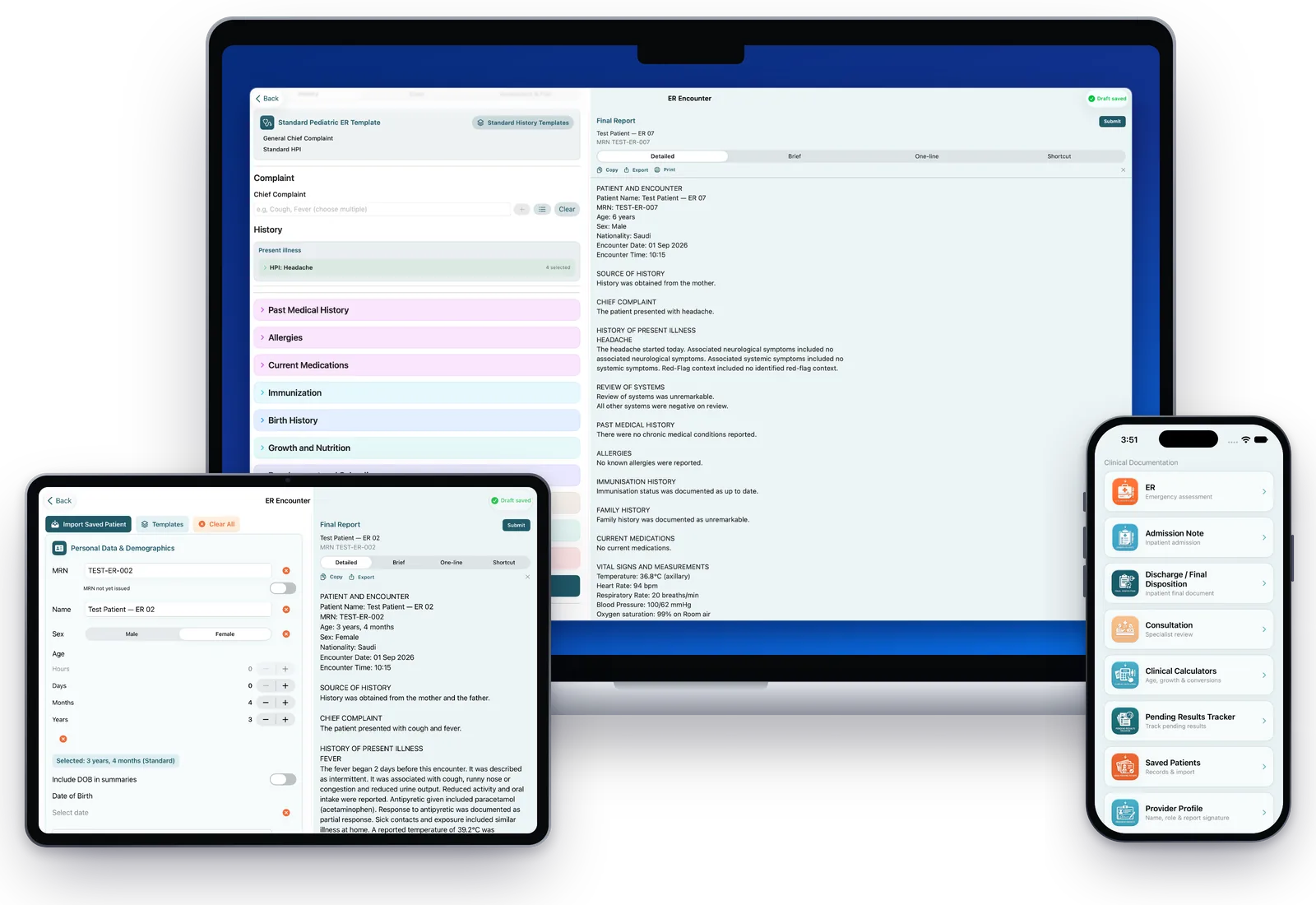
Screens show synthetic demonstration data.
Complete feature set
Everything needed for structured pediatric documentation.
From the first entry to the final report, PediaFlux keeps the workflow organized, local and under the clinician’s control.
Automatic draft saving
The active encounter is saved automatically while you work.
Works offline
Core clinical documentation does not require an internet connection.
No AI
No artificial intelligence generates, infers or recommends clinical content.
Local-first records
Patient records and drafts stay on the device, not on PediaFlux servers.
Pediatric workflows
Emergency, Admission, Pediatric and Newborn Discharge, and Consultation.
Age-adapted documentation
Structured history for neonates, infants and older children.
Four report formats
Detailed, Brief, One-line and Shortcut, ready to review before export.
Templates and encrypted backup
Reuse structured selections and create password-protected backups you control.
The PediaFlux family
One PediaFlux. Three focused apps.
Each app is built around the setting where the documentation happens, on the same structured, clinician-controlled foundation.
PediaFlux Emergency
Structured documentation for pediatric emergency care.
- Emergency encounter
- Admission Note
- Pediatric Discharge and Newborn Discharge
- Saved documentation templates
PediaFlux Inpatient
Documentation for children cared for on the ward.
- Inpatient documentation workflows
- Progress notes across the hospital stay
- Consultation documentation
PediaFlux OPD
Documentation for outpatient pediatric clinics.
- General pediatric clinic visits
- Pediatric specialty clinic visits
- Structured visit reasons and history
PediaFlux Emergency is the first release. PediaFlux Inpatient and PediaFlux OPD are planned for later releases; workflows and features may change between versions.
Workflows
One clinical structure across the encounters you document.
Each workflow keeps its own sections and level of detail, so notes read consistently from the emergency room to discharge.
Emergency
Document pediatric Emergency encounters across History, Exam and Assessment & Plan, starting from an age-adapted history template.
Admission
Record Admission Notes for inpatient admission in the same structured order.
Discharge
Prepare Pediatric and Newborn Discharge documents, including a curated newborn examination catalog where only documented findings are included.
Consultation
Record consultation requests and responses with referring team, consulting specialty, urgency and direction.
Structured documentation
History, Exam, Assessment & Plan — in the same order every time.
Move through the encounter step by step. Long histories stay organized in collapsible sections you open only when you need them.
- Past Medical, Birth, Allergies, Medications, Immunization, Feeding, Growth, Development, Family and Social History, and Review of Systems
- Age entered in hours, days, months and years for newborns through older children
- Infant and standard pediatric history templates

Screens show synthetic demonstration data.
Reports & clinician review
Review the report before you finalize it.
The Final Report is composed beside the form as you document. Choose Detailed, Brief, One-line or Shortcut, then copy or export when you are ready.
- Every generated report is a draft until you have reviewed it
- PediaFlux organizes what you enter or select — it does not add clinical findings of its own
- You choose when content is copied, exported, printed or shared

Screens show synthetic demonstration data.
Saved templates
Save the structure you use most.
Save structured documentation selections as templates and reuse them in supported workflows. Templates keep your selections — not patient identity, encounter dates, measurements or results.
- Applying a template never submits or finalizes a record
- Every template-filled item remains a draft for you to review and correct
- Name and organize templates in your own categories
Saved templates are currently available in supported PediaFlux Emergency workflows.

Screens show synthetic demonstration data.
Privacy & data
Clinical records are stored on your device.
PediaFlux is designed local-first. You decide when anything leaves the device, and where it goes.
Local-first storage
Patient records and drafts are stored locally on the device you use, not on PediaFlux servers.
No internet required
Core clinical documentation works without an internet connection. App Store purchases and system services may require connectivity.
No AI
PediaFlux does not use artificial intelligence to generate, infer or recommend clinical content.
Encrypted backups you control
Backups are created only when you choose and are protected by a password you set. The password cannot be recovered.
Devices
Designed for iPhone, iPad and Mac.
Layouts adapt to each screen — from a focused single column on iPhone to side-by-side documentation and report review on larger displays.

iPhone
Choose a workflow and document on the move.

iPad
Form and report side by side.

Mac
A wide workspace for writing up and review. The Mac version is planned for a later release.
Screens show synthetic demonstration data.
For licensed physicians
PediaFlux is a clinical documentation tool. It does not diagnose, prescribe or recommend treatment, and it does not replace clinical judgment, supervision, institutional protocols or your organization's medical record. You remain responsible for reviewing and correcting all content before it is signed, exported or added to a medical record.
Questions about PediaFlux?
Find help topics and contact details. Please never send patient-identifiable information.